Kubernetes for Java Developers
Kubernetes for Java Developers
https://github.com/arun-gupta/lil-kubernetes-for-java https://github.com/GoogleContainerTools/jib https://www.aquasec.com/wiki/display/containers/Docker+Architecture
K8s workflow for Java developers
- Package Java Application
- Create and Publish Docker Image
- Create a Kubernetes Resource Manifest
- Create K8s cluster
- Deploy Kubernetes resources
Part 1 - Docker
Docker Workflow
- Registry: is a stateless server-side which stores docker images.
- Client Host: Docker CLI (dev localhost or CI/CD pipeline) to interact with Docker Daemon.
- docker container run
- docker image push
- docker image pull
- Server Host: images are downloaded here and containers run
- Docker Engine Rest API: API used by applications to interact with the Docker Daemon.
- Docker Daemon: persistent background process that manages Docker images, containers, networks and volumes.
- Client Host gives the command to Server Host, which then communicates with Registry on client’s behalf.
Create Docker Images
-
Create from Dockerfile (always starts with FROM). Multiple FROM statements are allowed, enables run stages.
-
Build image from Dockerfile, then basic run, and then run with some options:
$ docker image build

$ docker container run <image name>

$ docker container run <-d detached or background> <-it interactive> -p <port:port> <image name>
-
You can use .dockerignore file to filter files to be added while building the image.
-
Multi-stage Dockerfile.
- Build stage (FROM maven): builds the Application using a Maven container.
- Production stage (FROM openjdk): in production only jdk is required, not maven or anything else.
FROM maven:3.5-jdk-8 as BUILD

ADD repository.tar.gz /usr/share/maven/ref/

COPY . /usr/src/app
WORKDIR /usr/src/app
RUN mvn -s /usr/share/maven/ref/settings-docker.xml package

FROM openjdk:8-jre
EXPOSE 8080 5005
COPY --from=BUILD /usr/src/app/target /opt/target
WORKDIR /opt/target
ENV _JAVA_OPTIONS '-agentlib:jdwp=transport=dt_socket,server=y,suspend=n,address=5005'

CMD ["java", "-jar", "greeting.war"]
- See chapter 2 for Docker commands: https://github.com/arun-gupta/lil-kubernetes-for-java/tree/master/chapter2
Build a Docker Image Using JIB
Jib builds optimized Docker and OCI images for your Java applications without a Docker daemon
- and without deep mastery of Docker best-practices. It is available as plugins for Maven and Gradle and as a Java library.
https://github.com/GoogleContainerTools/jib
- Builds Docker images for Java apps.
- Docker daemon not needed.
-
No Dockerfile required.
- In application’s pom.xml, there is a jib profile
[neojal@manjaro app]$ mvn package -Pjib
Minimal Docker image using custom JRE
- Tools to create custom/minimal JRE:
- jlink
- jdeps
Part 2 - Kubernetes
Can run in:
- desktop
- on-premises
- cloud
Kubernetes basic concepts
https://kubernetes.io/docs/concepts/
Container Orchestration: automated deployment, scaling, and management of containerized applications.
Kubernetes: is an open source project for container orchestration.
Kubernetes API objects: used to work with K8s to describe your clusters desired state:
- what applications or workloads you want to run.
- what container images they use.
- the number of replicas
- what network and disk resources you want to make available
- etc
kubectl: cli interface to interact with K8s API, which is also available for direct interaction.
Pod: basic building block of k8s, smallest deployable unit. * represents processes running on your cluster. * encapsulates an application’s container (or multiple), storage resources, a unique IP, and options of how the container(s) should run. * One-container-per-pod is most common. * k8s manages the pod, rather than the containers.
Replication: Each Pod is meant to run a single instance of a given application. If you want to scale your application horizontally (e.g., run multiple instances), you should use multiple Pods, one for each instance.
Pod Templates: Pod templates are pod specifications which are included in other objects, such as Replication Controllers, Jobs, and DaemonSets. Controllers use Pod Templates to make actual pods.
Pod manifest:
apiVersion: v1
kind: Pod
metadata:
  name: myapp-pod
  labels:
    app: myapp
spec:
  containers:
  - name: myapp-container
    image: busybox
    command: ['sh', '-c', 'echo Hello Kubernetes! && sleep 3600']
Kubernetes resources
Deployment: You describe a desired state in a Deployment, and the Deployment Controller changes the actual state to the desired state at a controlled rate.
Service: defines a logical set of Pods as a network service.
Kubernetes cluster concepts
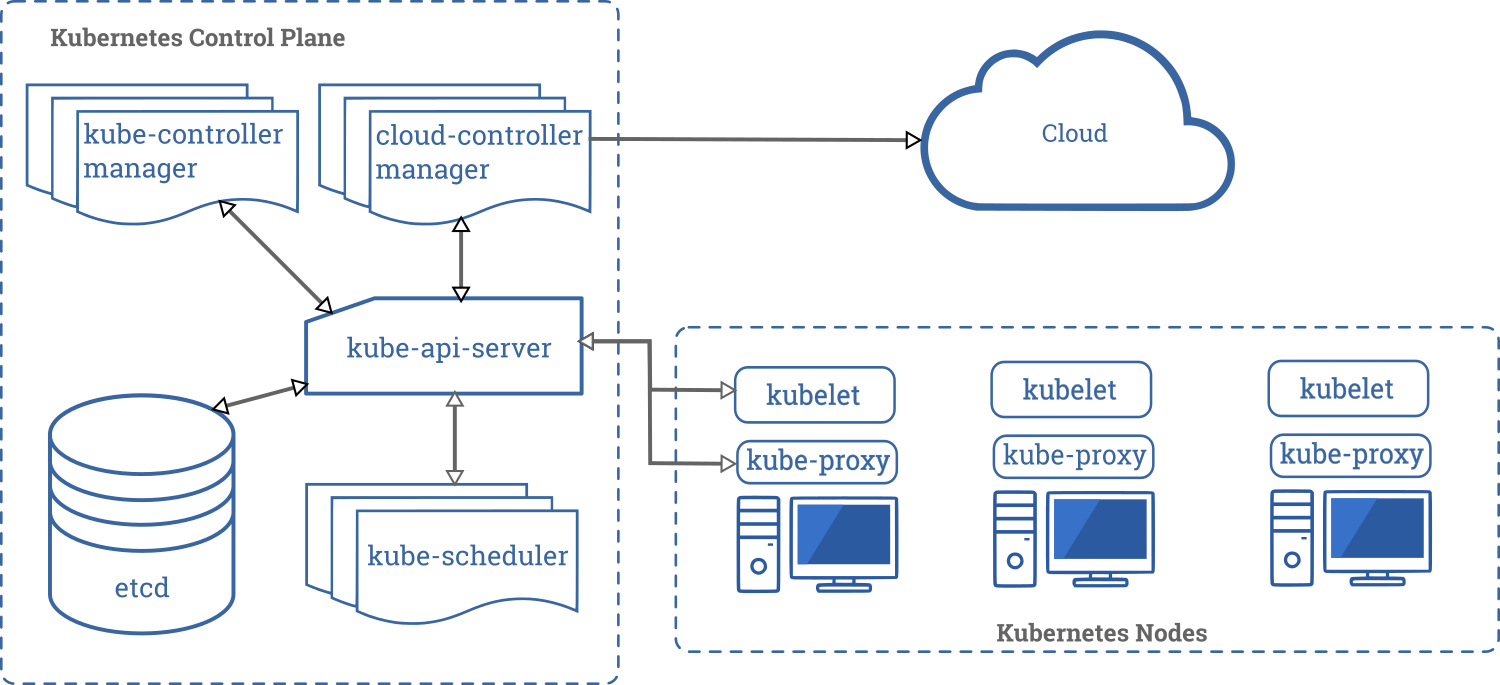
Running Kubernetes in Desktop
Install:
- Kubectl
- KVM/libvirtd (Kernel Virtual Machine)
- Minikube
Minikube-KVM KVM install on Arch
After installing KVM/libvirtd, minikube can create VMs using KVM!
$ kubectl version
$ minikube version

[neojal@manjaro ~]$ sudo systemctl enable libvirtd.service
[neojal@manjaro ~]$ sudo systemctl start libvirtd.service
[neojal@manjaro ~]$ minikube start
😄  minikube v1.6.2 on Arch 18.1.5
✨  Automatically selected the 'kvm2' driver (alternates: [none])
🔥  Creating kvm2 VM (CPUs=2, Memory=2000MB, Disk=20000MB) ...
🐳  Preparing Kubernetes v1.17.0 on Docker '19.03.5' ...
💾  Downloading kubelet v1.17.0
💾  Downloading kubeadm v1.17.0
🚜  Pulling images ...
🚀  Launching Kubernetes ...
⌛  Waiting for cluster to come online ...
🏄  Done! kubectl is now configured to use "minikube"
⚠️  /usr/bin/kubectl is version 0.0.0-master+70132b0f13, and is incompatible with Kubernetes 1.17.0. You will need to update /usr/bin/kubectl or use 'minikube kubectl' to connect with this cluster

[neojal@manjaro ~]$ kubectl config get-contexts
CURRENT   NAME       CLUSTER    AUTHINFO   NAMESPACE
*         minikube   minikube   minikube

# Move to project directory, then kubernetes manifest files:
[neojal@manjaro standalone]$ kubectl create -f greeting-deployment.yaml
deployment.apps/greeting created

[neojal@manjaro standalone]$ kubectl create -f greeting-service.yaml
service/greeting created

[neojal@manjaro standalone]$ kubectl get svc
NAME         TYPE           CLUSTER-IP     EXTERNAL-IP   PORT(S)          AGE
greeting     LoadBalancer   10.96.154.63   <pending>     8080:30405/TCP   37s
kubernetes   ClusterIP      10.96.0.1      <none>        443/TCP          21m

#... external ip <pending>... wtf!